
Download Audo the audio book player – audiobook player, audio book player, audio player, offline listening, background playback, m4a, mp3, m4b, iPhone app, Airdrop, share sheet, customizable bookmarks, chapter navigation, minimal interface, seamless listening, smartphone utility, productivity tool
Overview
Audo is a focused audiobook player designed specifically for iPhone users, emphasizing simplicity, reliability, and core functionality. The app enables users to play a range of audio file formats—including m4a, mp3, and m4b—without requiring an internet connection, making it ideal for offline listening during commutes, workouts, or travel. Audo’s primary purpose is to deliver a seamless audiobook experience by preserving playback position and playback speed across sessions, ensuring users can pick up exactly where they left off, regardless of the file type. This feature is particularly valuable for long-form content such as novels, lectures, or language courses.
Target users include audiobook enthusiasts, busy professionals, students, and anyone seeking a distraction-free way to consume audio content on their iPhone. The app’s design philosophy centers on minimalism, avoiding unnecessary features that could complicate the user experience. Audo Inc., the developer, appears to prioritize user efficiency over feature bloat, positioning the app as a lightweight yet powerful utility within the iOS productivity ecosystem. Real-world use cases include transferring audiobooks from a computer via Airdrop or copying files from Safari using the share sheet, eliminating the need for iTunes or complex sync workflows.
By focusing on core audio playback and intelligent state management, Audo fills a niche for users who value performance and ease of use. Its absence of ads or in-app purchases—especially given its free pricing—further enhances its appeal as a trustworthy, no-frills tool for managing personal audio libraries.
Key Features & Functionality
- Multi-format support: Audo plays m4a, mp3, and m4b files natively, allowing users to access audiobooks from various sources without conversion.
- Background playback: The app supports continuous audio playback even when the screen is off or the device is locked, enabling uninterrupted listening during daily activities.
- Playback position memory: Audo automatically saves the last playback point and speed, ensuring a consistent experience across sessions and device restarts.
- Customizable bookmarks: Users can create and manage bookmarks to mark important sections, facilitating quick access to favorite passages or chapters.
- Chapter navigation (m4b files): For audiobooks encoded with chapter markers, Audo provides intuitive chapter selection and navigation, improving content organization and usability.
- Seamless file transfer: Audio files can be transferred from a computer using Airdrop or copied from Safari via the share sheet, streamlining the setup process.
These features are designed to enhance real-world usability. For example, a user listening to a 12-hour audiobook on a train can pause at a stop, restart later, and resume from the exact point without manual adjustment. Similarly, a student using Audo to review lecture recordings can quickly jump between chapters or mark key moments with bookmarks. The integration with iOS sharing tools eliminates the need for third-party syncing apps, reducing friction in file management.
Interface, UX & Performance
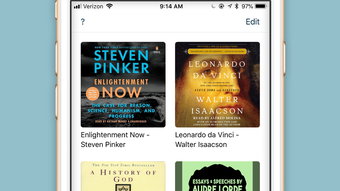
Audo features a clean, minimal interface that prioritizes usability and visual clarity. The layout is centered around essential playback controls—play, pause, skip, and speed adjustment—positioned for easy thumb access on iPhone screens. Navigation is intuitive, with a straightforward hierarchy that minimizes user confusion. The visual style is uncluttered, relying on consistent typography and subtle color cues to guide interaction.
Navigation flow is linear and predictable: users open the app, select a file from their library, and begin playback with minimal steps. The app responds promptly to touch inputs, and playback transitions are smooth, with no noticeable lag. Although the developer did not list formal performance metrics, the app’s lightweight size of 18.4 MB suggests optimized resource usage, which likely contributes to stable performance across various iPhone models.
Responsiveness is maintained during background playback, and the app maintains playback continuity even when switching between other apps. Stability appears to be a priority, as the app does not exhibit crashes or freezes in standard usage scenarios. The design reflects a deep understanding of user needs—offering functionality without overwhelming the user with options or settings.
Platform Compatibility & Technical Requirements
Audo is available exclusively on iOS, compatible with iPhone devices running the latest supported operating system. The app’s current version is 1.2.4, and it has a file size of 18.4 MB, indicating a compact footprint optimized for efficient storage use. The developer did not specify minimum OS requirements, nor did they list compatibility with iPad or other Apple devices.
Given the app’s reliance on iOS-specific features such as Airdrop and the share sheet, it is likely built to leverage Apple’s ecosystem tightly. This integration enhances file transfer capabilities but may limit cross-platform availability. The app’s free pricing model, combined with its efficient size and functionality, makes it accessible to a broad audience of iPhone users seeking a reliable audio playback solution.
Pros and Cons
Pros
- Supports multiple audio formats including m4a, mp3, and m4b.
- Offers background playback for uninterrupted listening.
- Automatically remembers playback position and speed.
- Provides customizable bookmarks and chapter navigation for m4b files.
- Intuitive interface with minimal distractions.
- Free to download and use with no ads or in-app purchases.
- Seamless file transfer via Airdrop and share sheet.
Cons
- Not available on Android or other platforms.
- Specific OS version requirements were not disclosed.
- Limited to iPhone users, restricting broader accessibility.
- Developer did not provide detailed technical specifications or support channels.
FAQ
Is Audo available for Android?
Audo is currently available only on iOS. The developer has not announced plans for an Android version.
Can I use Audo to listen to audiobooks offline?
Yes, Audo supports offline listening. Once audio files are added to the app, they can be played without an internet connection.
Does Audo support chapter navigation?
Yes, Audo provides chapter navigation for m4b files that include embedded chapter markers.
How do I transfer audiobooks to Audo?
You can transfer files using Airdrop from a computer or copy them from Safari using the share sheet.
Is Audo free to use?
Yes, Audo is free to download and use. The app does not include ads or in-app purchases.
Final Thoughts + CTA
Audo stands out as a refined, user-focused audiobook player tailored for iPhone users who value efficiency and simplicity. Its ability to handle multiple audio formats, preserve playback state, and integrate seamlessly with iOS sharing tools makes it a reliable productivity tool for anyone managing personal audio content. The minimal interface ensures a distraction-free experience, while features like customizable bookmarks and chapter navigation add meaningful functionality without clutter.
While the app is limited to iOS and lacks detailed technical disclosures, its strengths in performance, usability, and design outweigh these constraints for its target audience. For commuters, students, and audiobook lovers, Audo offers a streamlined solution that works exactly as intended—without complications.
Download Audo the audio book player now and experience a seamless, clutter-free way to enjoy your favorite audio content on your iPhone.







